
Uploading evidence with your assistant
Your assistant can put a document straight onto an Upload test — a test you satisfy by attaching a file as proof — and confirming the upload sets that test re-evaluating on its own. So don't ask for the test to be re-run afterwards; give it a moment, then ask for the result to be read back. Then open the document yourself — a green test is only as good as the file behind it.
First, check your assistant can actually move a file
This is the one thing your assistant does with UprootSecurity that a chat window alone can't do. The assistant has to send the file itself to the storage location UprootSecurity hands back. A coding assistant can do that, and so can a chat client with a connector that makes web requests on your behalf. A plain chat client cannot — it can read every test and every piece of evidence you have, but it can't send the file. If yours can't, upload the file in UprootSecurity directly.
Confirming an upload that was never transferred fails outright. That's deliberate: a confirmed upload always has a real file behind it, so you never end up with an evidence record pointing at nothing.
What actually happens
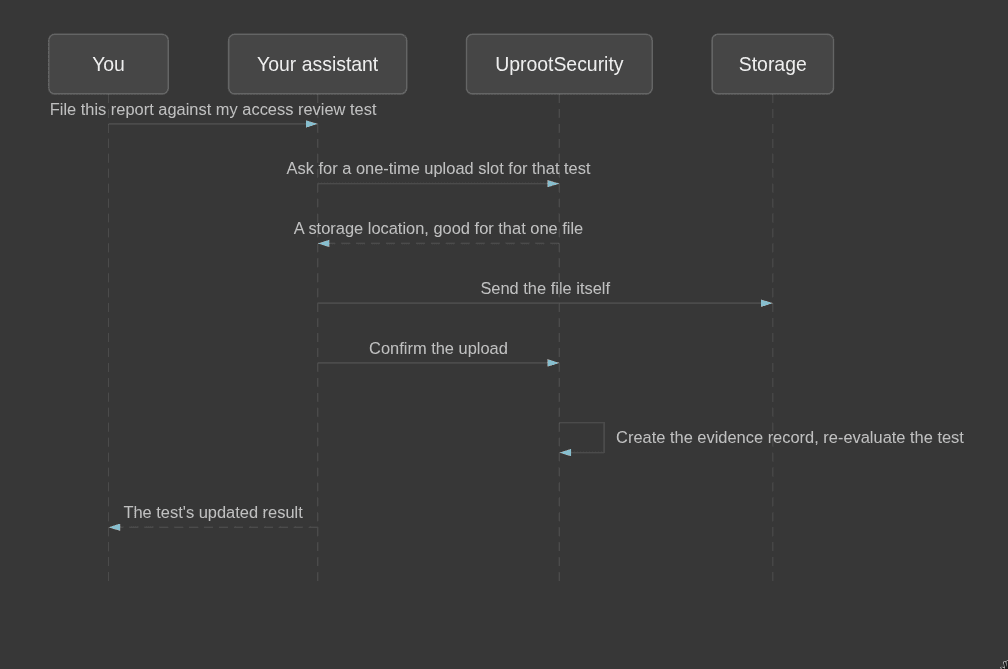
Four beats: ask for a slot, send the file, confirm, and the test re-evaluates itself. The confirmation is what makes it real — until it happens, the file isn't evidence.
Only Upload tests take a file
Ask for an upload slot on an integration test and UprootSecurity refuses. That's not a fault to troubleshoot: an integration test collects its own evidence from a connected source, so a document you hand it proves nothing. If an integration test is failing, fix the finding in the source system — or connect the source if it isn't connected yet — and then ask your assistant to run that test.
After confirming, read it back — don't re-run
Asking for a re-run after confirming is the mistake almost everyone makes once. Confirming already set the evaluation running, so starting it again tells you nothing new. Give it a moment, then ask your assistant to read the result instead: "show me that test now, and list its evidence." You want to see the new status and the document sitting against it.
You are accountable for what your assistant filed
A green test is not the same as correct evidence. An assistant will happily upload last quarter's access review, an unsigned draft, or a document that proves something adjacent to what the test actually asked for — and evaluation can only tell you evidence has landed, not that it's the evidence your auditor wanted. Your auditor will open that file.
So before you move on, check the document yourself: right period, final version, and it shows the thing the test asked you to prove. That check is the part of the job you can't delegate to your assistant — and it takes seconds.
Who can do this
Uploading evidence needs the Owner or Administrator role. Members and Auditors can have their assistant read tests and evidence, but not file new evidence — same limits as when they sign in.
Common mistakes
- Asking for a re-run after confirming. The test already re-evaluated. Read it back instead.
- Trying to attach a file to an integration test. It collects its own evidence — fix the source, then run the test.
- Trusting the status instead of the document. Open what your assistant filed before you count the test as done.