
What does a vendor review need before I can complete it?
A vendor review completes once it holds at least one uploaded report or one questionnaire — an upload on its own is enough. But if the review has a questionnaire, that questionnaire must be fully answered and submitted before you can finish, even when you've also uploaded reports. Completing the review is the moment the vendor review is marked Completed and the Vendor security reviews test passes.
What it takes to complete a review
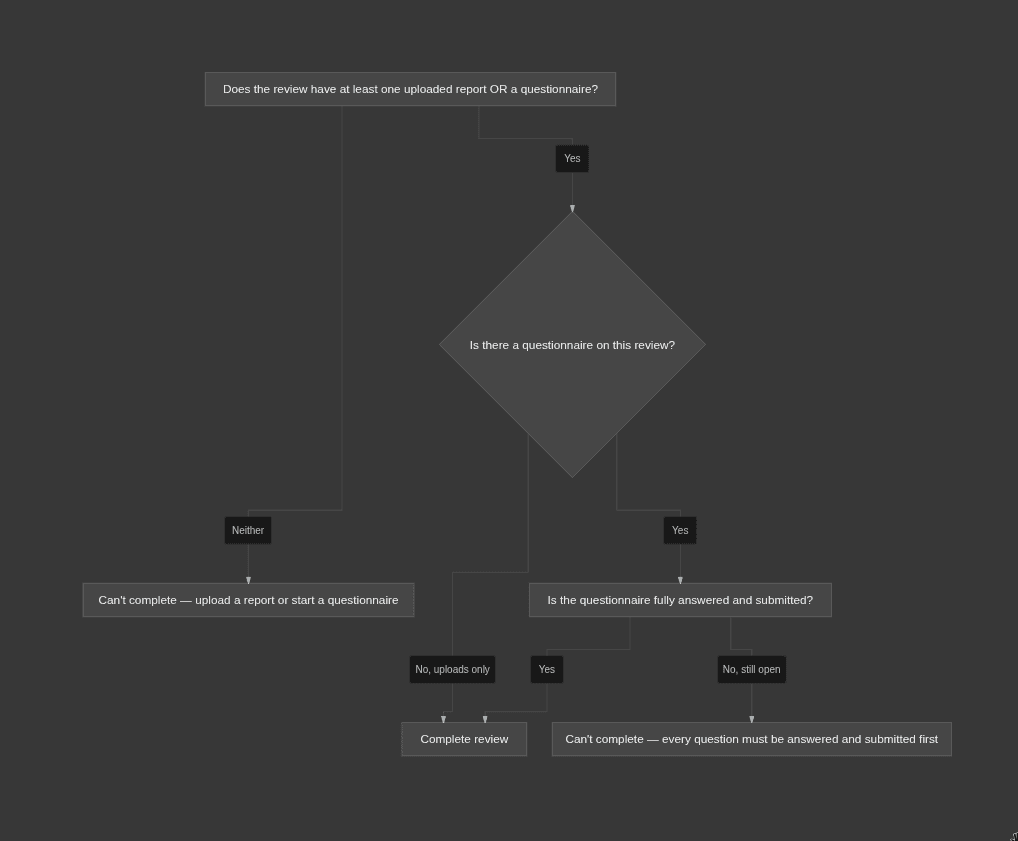
Click Complete review and one of two things happens: it completes, or you get the Cannot Complete Review message telling you exactly what's missing. Two conditions have to both be true:
- The review has at least one uploaded report or one questionnaire. An empty review can't be completed. An upload alone is enough — you don't need a questionnaire.
- If a questionnaire exists on the review, it must be fully answered and submitted. A questionnaire that's been started but isn't finished blocks completion — even if you've uploaded reports alongside it. Finish and submit it, or remove it, and completion unblocks.
Only the vendor's assigned owner can run the review workflow and complete it. If the Complete review action is rejected even though the requirements are met, check whether you're the assigned owner (see Vendor owner and permissions).
Which uploaded report satisfies which test — and which reports only feed findings, not the tests — is covered in Collecting vendor reports.
What completing the review does
Completing a review is what produces your evidence — nothing is stamped until you finish it.
- The vendor review is marked Completed, and the Vendor security reviews test passes for that vendor.
- A future review date is set, based on your Review Cycle (Yearly by default), counted from the completion date. The test stays passing until the review date passes — after which the vendor becomes Due for Review and you complete a fresh one. See Review cadence and when a review is due.
- Any SOC 2 / SOC 3 / Service Agreement reports inside the completed review now satisfy their tests.
An unfinished review stamps nothing. A vendor with an open review, or one that was never reviewed, fails the Vendor security reviews test.
Why a second review won't start
You can only have one open review per vendor at a time. If a review is already in progress, starting another is rejected — you have to complete the current review, or delete it, before a new one begins. This is the usual reason "start a review" appears to do nothing: there's already an open one waiting to be finished. Complete it (or delete it) and the next one will start.
Examples
- You uploaded the vendor's SOC 2 report and added no questionnaire. You can complete the review right away — the upload alone satisfies the completion gate. Once completed, that report also satisfies the Vendor SOC 2 reports test.
- You uploaded a report and started a questionnaire, but the questionnaire is half-answered. Completion is blocked. The report being present doesn't help — every question has to be answered and submitted first. Finish the questionnaire (or remove it) and you can complete.
- You uploaded only an ISO Report. You can complete the review — an upload is an upload for the completion gate. But that ISO Report satisfies none of the vendor tests, so Vendor SOC 2 reports and Third-party system connections stay unmet. To pass those, add a SOC 2 report or SOC 3 report, and a Service Agreement, inside a completed review.
Why it matters / what your auditor expects
An auditor wants to see that you review each vendor on a set cadence and keep their assurance reports on file — a SOC 2 (or SOC 3) for their controls, and a Service Agreement governing the connection. Completing the review is what records that judgment as evidence: it stamps the review date and files the reports against the vendor. A vendor sitting on an unfinished review looks unreviewed to the tests, no matter how much you've uploaded. For the control this ladders up to, see Why vendor reviews are required.
Common mistakes
- Thinking uploads finish the review on their own when a questionnaire is present. Once a questionnaire exists on the review, it must be fully answered and submitted — uploads don't override that.
- Expecting an ISO or Pentest report to pass the SOC 2 test. They don't. Only a SOC 2 or SOC 3 report satisfies Vendor SOC 2 reports; only a Service Agreement satisfies Third-party system connections.
- Trying to start a new review while one is still open. Complete or delete the current review first — a vendor can't hold two open reviews.
- Leaving a review completed and assuming it stays passing forever. The vendor goes Due for Review once its next review date passes; you complete a fresh review to keep the test passing.